Best Forex Trading Platform for Beginners (2026 Guide)
Compare the best forex trading platforms for beginners in 2026. Explore MT5, cTrader, and TradingView terminals, execution latency, and mobile apps.
Selecting the best forex trading platform for beginners is the single most critical technical decision you make when starting your trading journey.
The wrong interface leads to costly fat-finger order errors, confusing lot calculations, and frustrating execution delays during volatile market hours.
In 2026, beginner forex traders are no longer trapped using clunky desktop software designed in the early 2000s.
Modern cloud terminals and clean mobile apps now provide institutional-grade charting, intuitive risk sliders, and direct liquidity connectivity right out of the box.
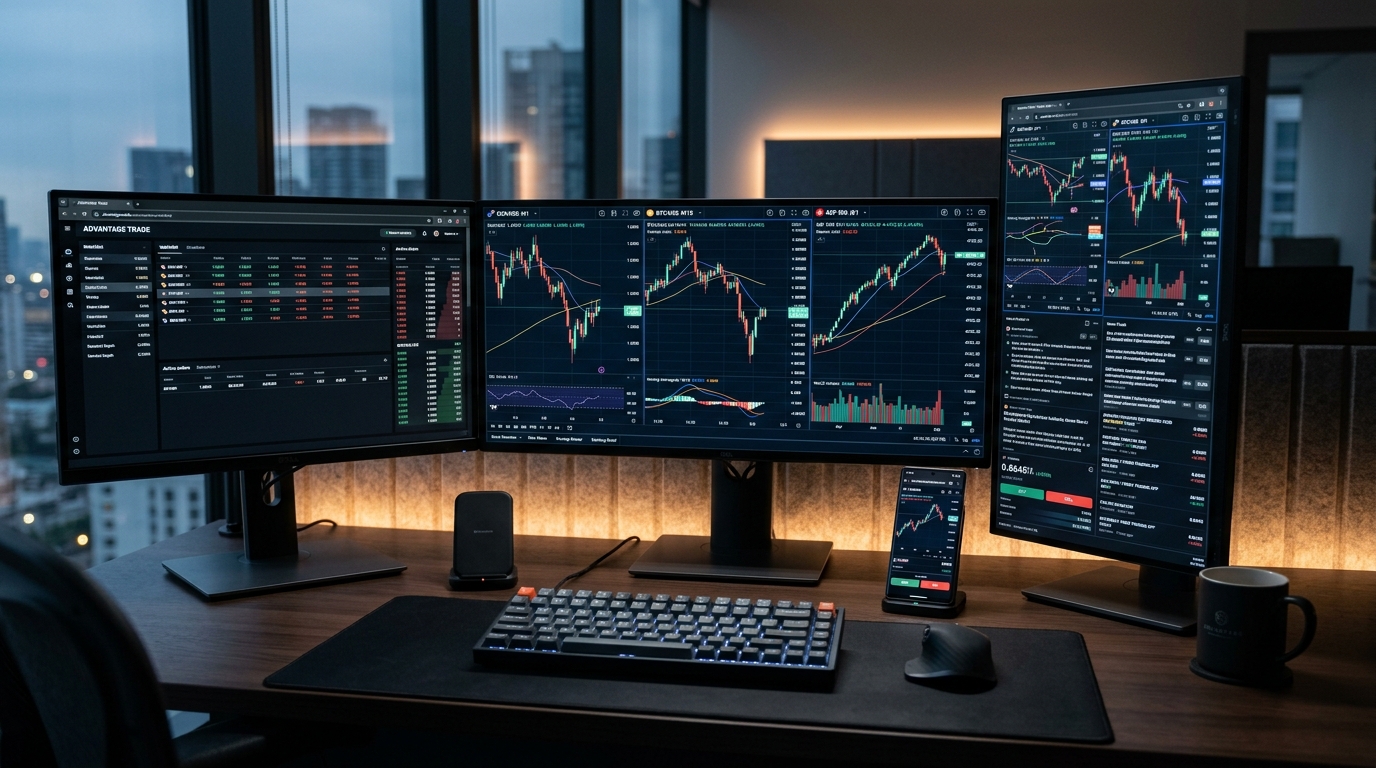
Whether you are trading a personal retail account or aiming to pass a funded evaluation with a proprietary trading firm, understanding the structural differences between MetaTrader 5 (MT5), cTrader, and TradingView is essential.
In this operator-grade guide, we compare ease of use, order bracket mechanics, mobile reliability, and real-world execution speeds to help you pick the right terminal for your trading style.
1. Quick Comparison Matrix: Top 3 Platforms at a Glance
When comparing the best trading platforms for beginner forex traders, market participants evaluate interface usability, execution latency, and order management.
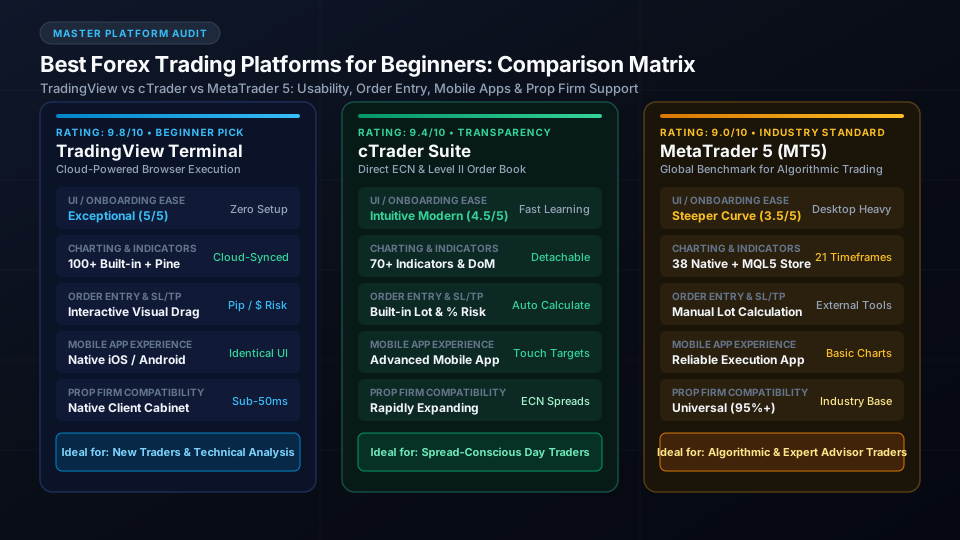
Before examining each terminal in depth, let us compare the core operational parameters of the top three platforms beginner forex traders encounter in 2026.
| Evaluation Metric | TradingView Browser Terminal | Spotware cTrader | MetaTrader 5 (MT5) |
|---|---|---|---|
| Best Suited For | Discretionary Price Action & Beginners | ECN Day Trading & Spread Transparency | Algorithmic EAs & Prop Firm Challenges |
| Interface Learning Curve | Very Low (Intuitive browser UI) | Low to Medium (Clean, modern workspace) | Medium to High (Legacy multi-window UI) |
| Installation Required | None (100% Web/Cloud-based) | Optional (Web, Desktop & Mobile) | Yes (Desktop install or broker web portal) |
| Chart Indicator Library | 100+ Built-in + 100k+ Pine Community | 70+ Built-in + C# Developer Hub | 38 Built-in + MQL5 Code Base |
| Visual Order Dragging | Yes (Drag SL/TP lines directly on chart) | Yes (Visual chart trade bars & pip tags) | Limited (Basic chart drag after placement) |
| Built-in Risk Calculator | Yes (Calculates cash risk & pip distance) | Yes (Automatic lot sizing by cash or % risk) | No (Requires third-party EA or script) |
| Level 2 Market Depth | Basic (Broker dependent) | Comprehensive (3 depth modes built-in) | Standard (Broker dependent DOM) |
| Prop Firm Availability | Rapidly Expanding (Direct Web Integrations) | Growing (Supported by top modern firms) | Universal (Supported by 95%+ of prop firms) |
Choosing between these three systems depends primarily on whether your daily routine centers on technical chart markups, active order book scalping, or running automated Expert Advisors.
Let us examine the concrete advantages and potential drawbacks of each platform starting with the most beginner-friendly solution.
2. TradingView Browser Terminal: The Best Overall Platform for Beginners
For retail beginners making their first currency trades, TradingView is unquestionably the smoothest and most visually intuitive trading platform available today.
Because it operates entirely within any modern web browser, you can log in from any computer without installing terminal packages or downloading broker server files.
Zero Local Installation & Automatic Cloud Syncing
Legacy trading platforms require downloading complex setup executables and configuring broker server IP addresses before you can view a single live price quote.
TradingView eliminates that setup friction completely by loading high-resolution candlestick charts instantly in Chrome, Safari, or Edge.
Furthermore, every trendline, Fibonacci retracement, and technical indicator you plot saves automatically to the cloud in real time.
If you mark up a support level on your laptop during lunch, that exact markup appears instantly when you open your charts on your phone or home desktop.
Visual Risk Brackets & 1-Click Order Execution
Risk management is where most beginner traders fail, frequently entering incorrect position sizes because calculating pips under pressure is confusing.
To ensure you never risk more capital than planned, use our free Lot Size Calculator before sending orders to market.
TradingView solves order entry anxiety by offering interactive visual order tickets directly on the chart screen.
When placing a trade, you simply drag your Stop Loss and Take Profit lines to your desired chart levels, and the platform displays your exact dollar loss and gain before you click confirm.
Pine Script & Massive Community Indicator Library
TradingView is powered by Pine Script, an elegant and lightweight programming language that allows traders to build custom indicators and automated alerts.
Even if you never write a single line of code, you gain instant access to over 100,000 free community-contributed indicators created by professional analysts worldwide.
Traders exploring high-probability chart setups can study our operational breakdown of break of structure examples to master market structure shifts.
With TradingView, adding multi-timeframe fair value gaps, moving average ribbons, and session volume profiles requires only two mouse clicks.
3. cTrader Suite: The Best Choice for Spread Transparency & ECN Execution
Developed by Spotware Systems, cTrader is widely considered the premier trading terminal for traders who prioritize institutional transparency and raw ECN execution.
While MetaTrader was designed around broker-centric architectures, cTrader was engineered specifically to prevent broker intervention and artificial spread manipulation.
Intuitive Depth of Market (Level II Pricing)
Unlike basic retail interfaces that show only a single bid and ask price, cTrader provides built-in Level 2 Depth of Market (DoM).
This order book transparency reveals the exact liquidity volumes waiting at different price levels, allowing beginners to see real institutional order flow.
To understand how institutional liquidity matching operates beneath retail terminals, explore our detailed guide on what is an institutional trading platform.
Having transparent order book visibility helps you avoid placing large market orders into thin liquidity pockets where severe slippage occurs.
Built-in Risk Management & Pip-Value Calculators
One of cTrader's greatest strengths for beginner forex traders is its integrated order ticket risk calculator.
You do not need external calculation spreadsheets or third-party plugins to calculate your position size before entering the market.
You simply select your desired risk percentage (such as 1% of account equity) or enter a specific dollar loss limit (such as $100).
cTrader instantly computes the exact lot size required down to micro-lots, ensuring you never violate personal risk parameters or evaluation drawdown thresholds.
Detachable Multi-Monitor Windows & cBot Automation
For traders working across multiple monitors, cTrader allows you to detach individual chart tiles and dock them across separate physical screens.
Every detached chart window retains full drawing tool functionality and independent timeframe settings without lagging system memory.
For algorithmic traders, cTrader utilizes cBot, an API written in standard C# rather than proprietary scripting languages.
Beginners who want to automate repetitive tasks can leverage the massive global C# developer ecosystem and run backtests using authentic tick data with variable spreads.
Skip the monthly fees
Own your prop firm platform outright. One time purchase.
Full source code. Live in 7 days. No revenue share. No monthly SaaS bill. See the exact platform before paying anything.
Demo login: haris / asdf1122. No signup needed
4. MetaTrader 5 (MT5): The Global Prop Firm & Algorithmic Standard
MetaTrader 5 (MT5), built by MetaQuotes Software, is the most widely deployed trading terminal across global forex brokers and proprietary trading firms.
While its user interface feels dated compared to TradingView and cTrader, MT5 remains the undisputed benchmark for high-speed algorithmic execution.
Universal Prop Firm Compatibility & Liquidity Bridges
If your objective is to earn funded trading capital through prop firm evaluations, mastering MT5 is practically mandatory.
Over 90% of prop firms and retail brokers offer MT5 accounts because of its rock-solid server bridges and battle-tested liquidity connectivity.
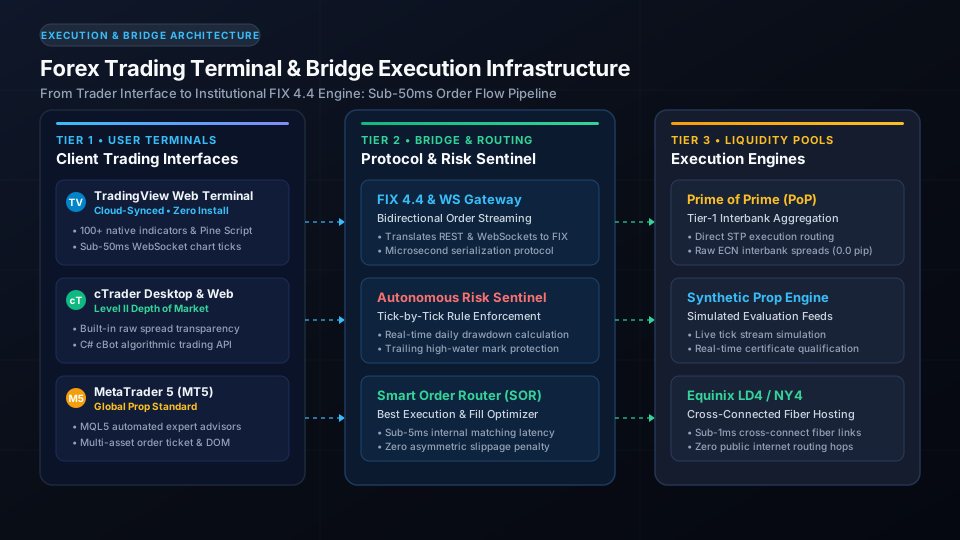
Brokers and prop firms rely on MT5 because it connects directly to institutional FIX 4.4 clearing houses and multi-asset price engines.
If you are curious how firms set up their trading infrastructure, review our comprehensive breakdown of how to start a forex brokerage.
21 Timeframes & MQL5 Automated Expert Advisors
MT5 offers 21 distinct charting timeframes, ranging from 1-minute and 2-minute charts up to monthly horizons, giving technical analysts unmatched timeframe granularity.
It also features a built-in economic calendar that displays macroeconomic data announcements directly along the bottom axis of your price charts.
The crown jewel of MT5 is the MQL5 algorithmic ecosystem and its multi-threaded strategy tester.
Traders can run automated Expert Advisors (EAs) across historical tick data using cloud distributed computing nodes, testing complex trading strategies across decades of market history in minutes.
The Legacy Desktop Interface: Why Beginners Struggle with MT5
Despite its raw computational power, MT5 presents a steep initial learning curve that frequently frustrates new forex traders.
The desktop interface uses dense 1990s-style toolbars, small fonts, and multi-step dialog boxes for entering basic stop-loss and take-profit orders.
Beginners must manually calculate lot sizes based on contract specifications, creating high risk for unit calculation errors.
Furthermore, MT5 does not sync drawn trendlines or Fibonacci levels across devices; chart markups created on your desktop terminal will not appear on your mobile app.
5. Mobile Trading: Finding the Best Forex Trading App for Beginners
Active currency trading requires a reliable mobile app for monitoring open positions and managing trade risk away from your desk.
However, mobile screens present unique usability challenges that separate beginner-friendly trading apps from clunky mobile terminals.
Mobile Charting vs On-the-Go Order Execution
A common beginner mistake is attempting to conduct complete technical analysis and multi-timeframe trend mapping entirely on a 6-inch smartphone screen.
Mobile devices are outstanding for monitoring open positions and executing emergency risk adjustments, but comprehensive chart preparation should always happen on a desktop display.
To time your market entries effectively around high-liquidity trading sessions, consult our detailed analysis of the best time to trade forex.
Trading during major session overlaps guarantees tighter spreads and cleaner price discovery across both desktop terminals and mobile applications.
Push Notification Latency & Emergency Stop Adjustments
When evaluating mobile forex apps, notification speed and order modification responsiveness are vastly more important than flashy animations.
If an unexpected geopolitical headline breaks, your mobile app must connect to the broker server within seconds to allow position closure.
TradingView leads the market in cloud-based alert delivery, sending instant push notifications to your smartphone when price crosses your predefined horizontal levels.
Both cTrader and MT5 mobile apps offer reliable biometric logins and one-tap order liquidation to protect account equity during unexpected volatility spikes.
How TradingView, cTrader, and MT5 Apps Stack Up on iOS and Android
On mobile operating systems, TradingView provides the cleanest touch-optimized charting experience, featuring smooth pinch-to-zoom gestures and full indicator access.
cTrader's mobile application is equally impressive, offering one-touch quick trade buttons, trailing stop adjustments, and live margin utilization telemetry.
MT5 Mobile delivers ultra-fast order execution and low battery consumption, but its mobile charting tools and drawing precision feel rigid.
For most beginners, using TradingView for chart analysis and cTrader or MT5 for rapid mobile order execution represents the ideal hybrid workflow.
6. Execution Latency, Spreads, and Commission Models Explained
Understanding how trading platforms interact with broker fee structures is crucial for preserving your starting capital.
A platform may feature beautiful chart graphics, but if its execution bridge suffers from latency or wide spread markups, your trading profitability will suffer.
Raw ECN Spreads vs Commission-Free Markup Pricing
Forex brokers and trading platforms typically operate under two distinct commercial pricing models: Raw ECN accounts or Standard commission-free accounts.
Beginners frequently make the mistake of choosing commission-free accounts, believing they are saving money on transaction overhead.
In reality, commission-free accounts feature artificial spread markups, widening the gap between bid and ask prices by 1.0 to 1.8 pips per trade.
On an ECN account (standard on cTrader and professional MT5 bridges), you trade on raw 0.0-pip interbank spreads and pay a transparent commission of $3 to $7 per round-turn lot.
Why Sub-50ms Execution Matters for Beginner Risk Management
Execution latency refers to the time elapsed between clicking the buy or sell button on your terminal and receiving confirmation that the broker filled your order.
Modern cloud-connected terminals achieve execution speeds between 15ms and 50ms when routed through fiber cross-connects in Equinix LD4 (London) or NY4 (New York).
High latency (200ms+) exposes your market orders to slippage, meaning your order fills at a worse price than displayed on your chart.
During high-volatility news events, a 200ms delay can turn a planned 5-pip stop loss into an unexpected 15-pip balance drawdown.
Avoiding Dealing Desk Re-Quotes and Artificial Slippage
Legacy retail brokers frequently operate B-book dealing desks that review client orders before confirming fills, resulting in annoying re-quote popups.
Modern ECN and STP platforms like cTrader route client orders directly to interbank liquidity aggregators without human dealer intervention.
To visualize standard lot values across currency pairs before entering trades, review our reference forex lot size chart.
Trading on transparent platforms ensures that market orders receive price improvement whenever favorable liquidity becomes available.
7. Prop Firm Trading: How Platforms Affect Your Funded Account Evaluation
Many beginner forex traders choose to test their skills in proprietary trading firm evaluations rather than risking substantial personal savings.
However, trading inside a prop firm introduces strict risk parameters that demand precise platform execution.
Daily Drawdown Calculations Across Different Terminals
Prop firms enforce strict daily drawdown limits (typically 4% to 5%) and maximum overall loss floors (typically 8% to 10%).
Different platforms handle daily equity resets and high-water mark calculations differently depending on broker server time zones.
To master how daily loss limits are calculated, study our guide on prop firm challenge rules and consistency guidelines.
Having a platform with real-time equity gauges prevents accidental rule breaches caused by overnight swap charges or sudden rollover spread widening.
Matching Your Platform to Challenge Rules and Reset Clocks
When participating in funded trader evaluations, tracking midnight server reset times is just as important as reading candlestick charts.
To ensure you never hold oversized exposure into midnight rollover, utilize our free Prop Firm Reset Clock Tracker during active trading days.
Traders who prefer browser simplicity can explore firms that embed TradingView terminals directly into their client cabinet.
If you are searching for affordable evaluation options, check our curated directory of the cheapest prop firm challenges to compare platform offerings.
8. Essential Free Tools for Beginner Forex Traders
Building long-term trading consistency requires integrating quantitative calculation tools into your daily pre-market preparation routine.
LaunchPropFirm provides a suite of institutional-grade web calculators completely free to help beginner traders eliminate manual sizing errors:
- Prop Firm Lot Size Calculator: Calculate your exact position size in lots based on your cash risk limit and currency pair pip distance.
- Prop Firm Reset Clock Tracker: Track exact server midnight reset countdowns across major prop firm platforms to protect your daily drawdown buffer.
- Prop Firm vs Personal Account Calculator: Compare capital growth projections between small personal retail accounts and institutional funded accounts.
- Free Trade Journal Guide: Learn how top traders track their trade execution metrics, win rates, and profit factors across different trading terminals.
- Interactive Tools Directory: Explore our comprehensive library of 13+ institutional financial simulators and prop firm calculators.
Frequently Asked Questions About Beginner Forex Trading Platforms
What is the easiest forex trading platform for a complete beginner?
TradingView is widely considered the easiest forex trading platform for complete beginners due to its clean web interface and cloud syncing.
Because it requires zero software installation and offers interactive visual order dragging, new traders can analyze charts and execute orders without technical confusion.
Is MetaTrader 5 (MT5) or cTrader better for beginner forex traders?
cTrader is generally better than MT5 for beginners who prioritize modern user interfaces, built-in risk calculators, and transparent Level 2 ECN pricing.
However, MT5 remains the essential platform if you plan to trade with proprietary trading firms or run automated trading algorithms using Expert Advisors.
Can I trade forex on my phone without using a desktop computer?
While you can execute and monitor trades using mobile apps, conducting technical analysis solely on a smartphone screen is not recommended for beginners.
Professional traders perform multi-timeframe chart markups on desktop displays and use mobile apps primarily for monitoring open positions and setting emergency stops.
What is the difference between Level 1 and Level 2 market data?
Level 1 market data displays only the current best bid and ask price available on your broker's price feed.
Level 2 market data displays the complete order book depth, showing the resting liquidity volumes available at multiple price rungs above and below the current spread.
Do proprietary trading firms support TradingView for evaluations?
Yes, an increasing number of modern proprietary trading firms now offer native TradingView browser terminals embedded directly inside their client portals.
This enables traders to pass evaluation challenges using TradingView charts with sub-50ms execution speed while avoiding third-party terminal installations.
How does execution latency impact beginner forex trading results?
Execution latency determines how quickly your buy or sell orders reach the broker's matching engine and receive price fills.
High latency exceeding 150ms can cause severe slippage during volatile market sessions, resulting in worse entry prices and larger stop-loss drawdowns than anticipated.
Evaluate Your Prop Firm Readiness Score (0-100)
Answer 5 quick operational questions about your acquisition channels, runway, and engine tech to get a personalized launch roadmap.

M.Haris
Founder & Platform ArchitectBuilding open prop trading software infrastructure for operators worldwide
I built LaunchPropFirm to give forex educators, trading communities, and fintech operators complete ownership of their platform with full source code and zero monthly SaaS rent. Every article on this blog is drawn from hands-on platform development, live MT5 risk bridge mechanics, and real operator economics.
All content, financial models, ROI estimates, and architecture guides on LaunchPropFirm are published strictly for educational and informational purposes. LaunchPropFirm provides institutional prop trading software and technology infrastructure; it does not operate as a broker, custodian, or registered investment advisor.
Evaluation challenges and funded trader accounts referenced in this guide operate in simulated demo trading environments using real-time market data feeds. Simulated trading results do not represent actual trading performance or financial advice.
Recommended Next Reads
Hand-picked operator guides to scale your prop trading platform.
Free Prop Firm Competitions: Win Funded Accounts in 2026
Join the best free prop firm competitions in 2026. Compare monthly prize pools, funded account rewards, leaderboard rules, and payout terms.
When Does a Bearish Market Become Bullish in Forex? (2026)
Learn when a bearish market becomes bullish in forex. Master lower high breaks, CHoCH vs MSS rules, wick sweep traps, and high-R:R trend reversal setups.
Skip the monthly fees
Own your prop firm platform outright. One time purchase.
Full source code. Live in 7 days. No revenue share. No monthly SaaS bill. See the exact platform before paying anything.
Demo login: haris / asdf1122. No signup needed